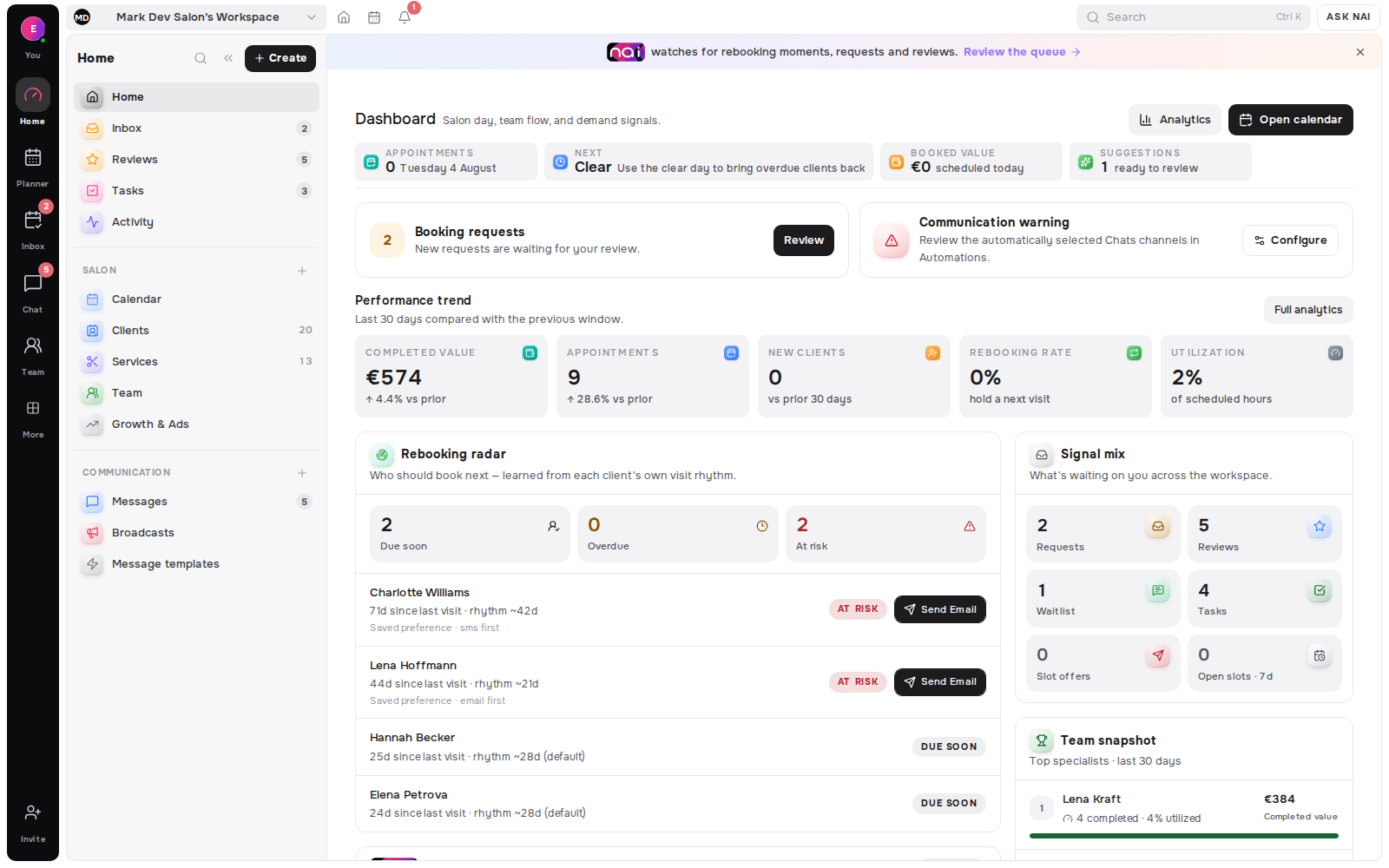
One inbox is worth building for one reason: a reply is better when the client record, the next booking and the past visits are visible beside it. It is not worth building to make four logos sit in one row. The channels behind those logos have different documented rules, and a good inbox keeps those rules visible rather than pretending they are the same.
Clients rarely choose a channel because it fits your software. They write where the conversation already feels natural: Instagram after seeing your work, WhatsApp from a saved number, Telegram through a connected bot, or SMS when a short service update is enough.
The operational problem is not the number of icons. It is losing the relationship while switching between them.
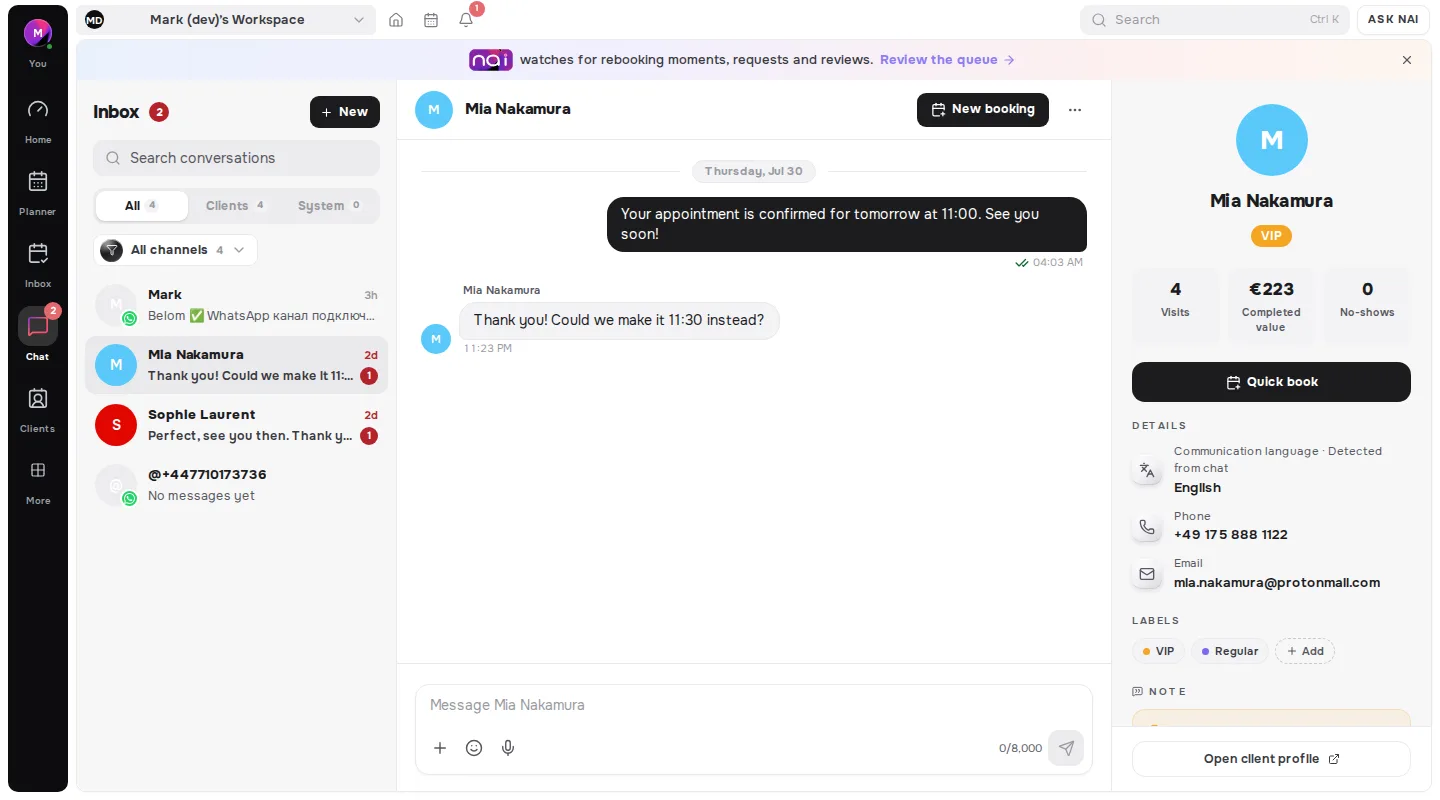
Belom Messages brings supported channel threads beside the client record, booking history, notes and upcoming visit. The aim is one working context for the team, even when the provider rules behind each channel stay different.
Key takeaways
- One inbox is about context beside the reply, not about collecting channels.
- Providers impose real limits, such as WhatsApp's documented 24-hour customer service window.
- Connect the routes clients already use and the team can answer. An unanswered channel is worse than a missing one.
- Drafting and sending are different things. Keep a person on the send button.
- Access should follow role and assignment, not sit open to everyone by default.
One context does not mean every channel is identical
WhatsApp Business, Instagram Direct, Facebook Messenger and Telegram can appear as connected conversation threads. Email and SMS remain useful delivery rails for service communication. SMS is not presented as a full social-style thread when the connected capability is outbound delivery.
Each provider still has its own connection and delivery rules:
- WhatsApp Business uses the connected business number. The 24-hour service window and Meta-approved business delivery paths still apply.
- Instagram Direct requires a supported professional account connection.
- Facebook Messenger connects through the business's Facebook Page.
- Telegram uses a connected bot and is available from the Free plan.
- SMS uses segment packs, and multipart messages can consume more than one segment.
- Email provides a baseline for booking and service communication, with a monthly allowance on every current tier.
Belom does not erase those differences. It keeps them visible while attaching the useful client and booking context to the work.
The client record belongs beside the reply
Opening a message should answer more than "what did they just say?" A useful inbox can also show:
- Who the client is.
- What is booked next.
- Which services and visits came before.
- The saved communication language.
- Relevant notes and tags.
- Whether the teammate has permission to see the record.
That context changes small decisions. A question about availability can be answered against the real planner. A returning client does not need to explain the last service again. A teammate can see the upcoming visit without leaving the thread.
The shared record also reduces duplicate histories. A client who writes on Instagram and later moves to WhatsApp can remain attached to the same relationship when the identities are correctly connected.
NAI prepares the first draft, not the final action
NAI can use the bounded context of the active thread, client language and booking intent to prepare a reply in the message composer. If available times are relevant, it can resolve real bookable slots from the calendar.
The draft remains visible for a professional to review, edit and approve. NAI does not send a client message automatically. It does not publish a schedule change or content proposal on its own.
That boundary is important for two reasons. First, client conversations often contain nuance that the person handling the relationship should judge. Second, drafting and automation are different product behaviors. Rule-based broadcasts or rebooking automations use their own owner controls, consent checks and sending limits.
A good workflow is simple:
- Open the client thread.
- Review the linked booking and relationship context.
- Ask NAI for a draft when a first pass would help.
- Check names, service facts, time choices and tone.
- Edit anything that does not sound like the business.
- Press Send only when the reply is ready.
What messaging actually costs, and what it saves
Channel choice has a price attached, and the research is old enough to be stable. A review of 29 studies put the average appointment reminder at €0.41 (systematic review, 2011), with SMS and automated calls at €0.14 (same review) and manual phone calls at €0.90 (2011 review) per patient.
The same review found median non-attendance falling from 23.1% (2011 review) to 12.5% once reminders were in place. Interestingly, manual reminders cut the baseline by 39% while automated ones cut it by 29% (same systematic review) - a person is more effective and roughly six times more expensive.
Speed matters more than channel after something goes wrong. A prompt message after a no-show brought patients back within thirty days 22.2% (randomised clinical trial, 2024) of the time, against 11.6% (2024 trial) for a standard letter. An inbox that surfaces the thread quickly is worth more than one that supports another logo.
Plan limits keep usage explicit
Channel access and message allowances differ by plan. At the time of writing, the current default pricing works like this:
- Free includes Telegram, 70 emails per month and 10 NAI drafts per month.
- Pro includes Instagram and Messenger, 500 emails per month and unlimited NAI drafts under the current allowance.
- Studio 5 includes 2,000 emails per month.
- Studio 15 includes 5,000 emails per month and WhatsApp Business.
- Network 30 includes 10,000 emails per month and WhatsApp Business.
- WhatsApp Business is a monthly add-on on Free, Pro and Studio 5. Meta bills applicable business-initiated template delivery directly at its rates.
- Instagram and Messenger are available as an add-on on Free and included from Pro upward.
- SMS uses one-off segment packs across the current tiers.
Displayed defaults can change, so the pricing page and the effective offer inside the workspace remain the source to check before choosing a plan.
Shared does not mean unrestricted
A team inbox should not expose every client detail to every person by default. Belom uses workspace roles, thread participation and specialist assignment to scope access.
Owners and administrators manage channel connections and access. Managers coordinate within their operational boundary. Specialists work with assigned clients and conversations rather than receiving an unrestricted view of the whole salon.
Permissions also matter in the linked context. Client history, health details, payment facts, private notes and revenue can have different visibility rules. The inbox should bring the right context close, not bypass the rules around it.
Set up the inbox around real client habits
Do not connect every channel merely to fill a settings screen. Start with the routes clients already use and the team can reliably answer.
For each channel, decide:
- Who owns the connection.
- Which roles can open and reply to threads.
- How quickly the team intends to respond.
- Which details should remain restricted.
- When NAI drafting is useful.
- Which channel and message caps apply to the current plan.
- How consent, opt-outs and provider rules affect outbound communication.
Then test with a real internal account before inviting client traffic. Confirm the thread appears, the identity can be linked correctly, the reply sends through the intended business account and the right teammate can see the right context.
[ORIGINAL DATA] The providers publish the limits, and they are not the same
Methodology. On 19 August 2026 we retrieved the official developer documentation for the messaging channels a salon inbox typically connects, with a standard HTTP client. We recorded only rules printed on the provider's own page. Sample size: two providers returned readable rules, and the Instagram messaging-window pages we tried returned HTTP 404, so Instagram is marked unverified rather than described.
WhatsApp has a clock on the conversation. Meta documents it plainly: "When a WhatsApp user messages you or calls you, a 24-hour timer called a customer service window starts". While it is open, "you can send any of the service message types listed below to the user. When the window closes, you can only send pre-approved template messages". Outside the window, free-form replies are simply not available to you.
Telegram has a throttle rather than a clock. The Bot FAQ states three numbers. In a single chat, "avoid sending more than one message per second". In a group, bots "are not be able to send more than 20 messages per minute". For bulk notifications, bots "are not able to broadcast more than about 30 messages per second, unless they enable paid broadcasts".
| Channel. | Documented constraint. | What it means for a reply. |
|---|---|---|
| WhatsApp. | 24-hour customer service window. | After 24 hours, only approved templates. |
| Telegram. | 1 message per second per chat; ~30 per second bulk. | Free-form replies, throttled sending. |
| Instagram. | Unverified - documentation returned HTTP 404. | Check before relying on it. |
| SMS · Email. | Billed per segment or per message. | No conversational window, a direct cost instead. |
[UNIQUE INSIGHT] Put the two verified rules side by side and they are opposite in kind, which is the part that matters operationally. WhatsApp constrains when you may write, and Telegram constrains how fast. A team that thinks of these as "our messaging channels" will build one habit and get burned by whichever rule it forgot. The practical consequence is specific: on WhatsApp, a reply that waits until tomorrow is not a slow reply, it is a different and more expensive product requiring an approved template. That reframes the response-time policy from a service value into a cost control. It also explains why an inbox should show the channel's state next to the thread. Not because the team is curious about protocols, but because "you have four hours left to answer this freely" is the single most useful thing the software knows and the client cannot see.
Definitions used in this article
A connected thread is a client conversation the inbox can both read and reply to, as opposed to a delivery rail such as outbound SMS.
The customer service window is the period after a client's message during which a business may reply freely, for example WhatsApp's documented 24 hours.
A template message is pre-approved wording a business may send outside that window, which is why late replies cost more than prompt ones.
Identity linking means attaching one person's separate channel identities to a single client record, so history is not split in two.
Drafting means the assistant prepares text a person approves, which is different from automation that sends on a rule.
FAQ
Is one inbox worth it if clients only use one channel?
Yes, but for a different reason. The value is the client record beside the reply, not the number of channels.
Which channel should I connect first?
The one clients already use and your team can answer the same day. An unanswered channel is worse than a missing one.
Why can't I always reply on WhatsApp?
Because Meta documents a 24-hour customer service window, after which only approved templates may be sent.
Does the assistant send messages on its own?
No. It prepares a draft in the composer, and a person reviews, edits and sends.
Should everyone on the team see every thread?
No. Scope access by role and assignment, and keep health details, payment facts and private notes behind their own rules.
Is SMS worth paying for?
Often, for short service updates. Reminders cost roughly €0.14 by SMS against €0.90 for a manual call (2011 review).
Where this fits
One inbox is the reply side of the relationship loop. The timing side is in the client who comes back. The queue side is in how to know which client should book next. And the channel field that decides whether an offer is even read is in what a waitlist has to store.
Editorial note: written by the Belom product team from how the product actually works, not from vendor marketing. More about Belom, or contact us with a correction. Reviewed 19 August 2026.